
RDP error 0x904 / 0x7: "This computer can't connect to the remote computer"
Remote Desktop shows This computer can't connect to the remote computer. Try connecting again. If the problem continues, contact the owner of the remote computer or your network administrator. — Error code: 0x904, Extended error code: 0x7.
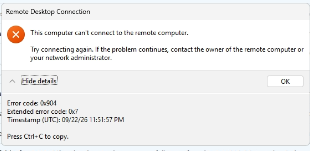
What it means
The Remote Desktop session couldn't be established — it's a connection or authorisation problem, not a wrong-password one. (A bad password shows a credential prompt or an authentication error occurred instead.) Through Reach that almost always means the tunnel to that machine wasn't set up: Reach isn't connected, or your account isn't yet allowed to reach that server.
Fixes, in order
- Check Reach is connected. Open the tray, confirm you're signed in and Proxy: ON, then try again.
- Ask your admin to grant you access to that machine. This is the most common cause for a new team member — your account may not be authorised for that server yet. Access to a shared PC or a cloud target is granted per person; see Share this PC and the Remote Targets guides for Google Cloud, AWS and Azure.
- Sign out and back in if Reach looks connected but nothing reaches the server — this re-registers a stale configuration.
- Check with your admin that the server or gateway itself is up.
Common questions
The connection worked yesterday and fails today
Your access may have been revoked, or the machine's share switched off — ask the machine's owner. If nothing changed on their side, sign out and back in (step 3).
Does 0x904 mean a wrong password?
No — a wrong password produces a credential prompt or an authentication error after the connection is established. 0x904 happens before that, at connection time.
Is this a Windows firewall problem on the server?
Not when you're connecting through Reach: the server doesn't need any inbound port open, because Reach delivers the connection from inside. If the same server is reachable directly on your LAN and refuses only through Reach, it's the access grant (step 2).
Still stuck?
Get in touch with the machine name and your team admin's details.